ENTRENCHED WW1 Script
3 tuned features plus the full Universal Script, updated weekly.
ENTRENCHED WW1 script preview
The real ZekeHub Universal Script menu as it loads in ENTRENCHED WW1, rebuilt for the browser. Click around to try it.

About the ENTRENCHED WW1 script
For ENTRENCHED WW1, ZekeHub layers 3 game-specific features (Silent Aim, No Recoil, and Reduced Spread) over the Universal Script's 36 core features — one subscription, 32+ games. ENTRENCHED WW1 is a military game with 316.4M visits. Runs on Volcano, Madium, Volt, Wave, and more, patched every week.
What the ENTRENCHED WW1 script does
ZekeHub tunes 3 features specifically for ENTRENCHED WW1, a military game with 316.4M visits, on top of the full Universal Script toolkit.
- Silent Aim
- No Recoil
- Reduced Spread
About ENTRENCHED WW1
Read the game description from RobloxHide the game description
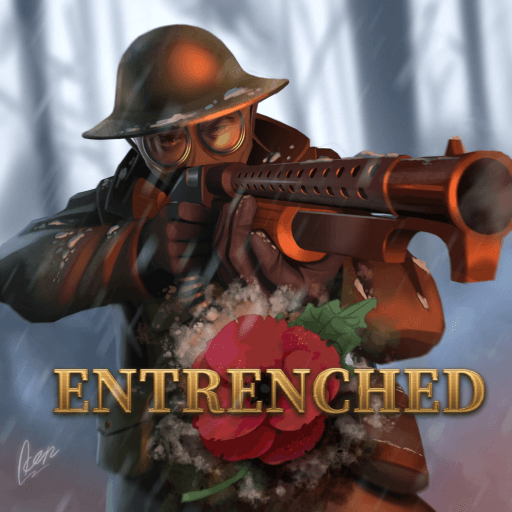
🥀 ENTRENCHED is loosely based on early 20th century wars, where the Entente and Central teams face off in the trenches!
💥 Choose from 9 different classes and partake in many battles ranging from turn-based attack and defense frontlines, perpetual attack versus defense conquest, and king of the hill style domination!
🛠️ Version v1.31 [🗣️ Callout Voicelines]
- 🗣️ Callout Voicelines
- 💾 Uniform and hats are saved for each country
- 🪖 Max squad size increased to 6
Playable on PC 🖥️, Mobile 📱 and Console 🎮
Search Tags:
Great War | Military | Shooter | Warfare | Fighting | FPS | TPS
Description sourced from Roblox.
All 36 Universal Script features
Every feature in the ZekeHub Universal Script works on ENTRENCHED WW1. One subscription covers ENTRENCHED WW1 and 32+ other Roblox games.
Full Universal Script feature list36+ shared features that also run on ENTRENCHED WW1 — tap to expandExpandCollapse
Aimbot
- Aimbot — Mouse-relative aimbot
- Keybind (default key MB2)
- Smoothness (1 to 20, default 5)
- Sticky Aim
Silent Aim
- Silent Aim — Redirects bullets without moving crosshair
- Silent Aim (default key None) — Hold to use silent aim, leave unbound to keep it always on
- Method (default Raycast)
- Style (default Aim At Target)
- Bullet Size (1x to 25x, default 4x)
- Hit Chance (0% to 100%, default 100%)
Shared Settings
- FOV Visible — Show FOV circle
- FOV Radius (1px to 500px, default 150px)
- FOV Sides (3° to 360°, default 360°)
- Visible Check — Only target visible players
- Team Check — Ignore teammates
- Random Hitbox — Pick random hitbox each shot
- Prediction — Predict target movement
- Hitbox — Single hitbox to aim at
- Body Part (default Head)
- Max Distance
- Distance (50 to 2000, default 500)
Trigger Bot
- Trigger Bot — Automatically shoots when aiming at target
- FOV (1 to 200, default 25)
- Reaction Time (0ms to 500ms, default 0ms)
- Delay (0s to 1s, default 0.1s)
Hitbox Expander
- Hitbox Expander — Enlarges player hitboxes
- Target Part (default All)
- Hitbox Size (1 to 20, default 5)
- Transparency (0 to 1, default 0.7)
Movement
- Walkspeed — Modify movement speed
- Speed (0 to 500, default 16)
- Jump Power — Modify jump height
- Power (0 to 500, default 50)
- Infinite Jump — Allows unlimited jumps
- Fly — Fly through the map
- Keybind (default key F)
- Speed (1 to 500, default 50)
- Noclip — Walk through walls
- Keybind (default key N)
- Jerk Off — Loops an R15 animation on your character, R6 rigs are not supported
- Play Animation (default key G)
- Speed Multiplier (1x to 5x, default 1x)
Whitelist
- Whitelist Teams — Whitelist specific teams
- Teams
- Whitelist Players — Whitelist specific players
- Players
ESP
- ESP — Visual player information
- Show Team — Show teammates in ESP
Boxes
- 2D Box — Draw 2D boxes around players
- Box Outline
- Box Fill — Fill boxes with transparency
- Fill Transparency (0 to 1, default 0.5)
- 3D Box — Draw 3D boxes around players
Text
- Name — Display player names
- Distance — Show distance to player
- Weapon — Display equipped weapon
- Health Text — Show health as text
Health Bar
- Health Bar — Display health bars
- Outline
Tracers
- Tracers — Draw lines to players
- Outline
- Origin (default Bottom)
Chams
- Chams — Highlight players through walls
- Fill Transparency (0 to 1, default 0.5)
- Visible Only
Off-Screen Arrow
- Off-Screen Arrow — Show arrow pointing to off-screen players
- Outline
- Size (5 to 30, default 15)
- Radius (50 to 300, default 150)
Menu
- Unload — Unload the script
- Menu Keybind
- Menu keybind (default key Delete)
Interface
- Watermark — Shows the Zeke Hub watermark with game name, FPS and ping
- Keybind list — Shows the on-screen list of active keybinds
Mobile
- On-Screen Buttons — Adds hold-to-aim buttons for the aimbot and silent aim, plus up/down buttons for fly on touch devices
- Reposition Buttons — Drag the buttons to move them instead of pressing them
- Button Size (40 to 150, default 78)
- Transparency (0 to 1, default 0.35)
ENTRENCHED WW1 script FAQ
01What executors are compatible with the ENTRENCHED WW1 script?
It runs on Volcano, Madium, Volt, Wave, ChocoSploit, and the other big executors; check the Executors page for current status.
02Is the ENTRENCHED WW1 script free?
£6.99 for 30 days or £18.99 once for Lifetime. That single key covers ENTRENCHED WW1 via the Universal Script and every other hub script.
03What features work on ENTRENCHED WW1?
3 features are tuned specifically for ENTRENCHED WW1 (Silent Aim, No Recoil, and Reduced Spread), on top of the full 36-feature Universal Script that works across every supported game.
04How often is the ENTRENCHED WW1 script updated?
The Universal Script that powers ENTRENCHED WW1 is updated weekly to track Roblox client changes, and the loader always pulls the latest version.
More questions? See the full FAQ →